Building a Fully Local LLM Voice Assistant: A Practical Architecture Guide

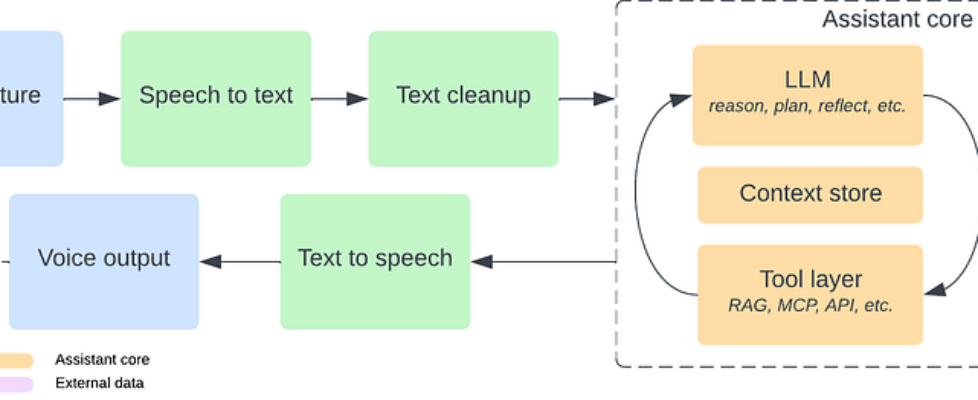
Author(s): Cosmo Q Originally published on Towards AI. Why your next assistant might run entirely on your own hardware. This past Thanksgiving, I set out to build a fully local voice assistant which should listen, think, act, and speak without relying on the cloud service. Why bother? Because today’s mainstream assistants are still tied to the cloud, limited by product rules, and hard to customize. Meanwhile, the AI development in the last two years completely changed what individuals can build at home. This guide summarizes everything I learned while building my own assistant. It’s more than a project recap — it’s a practical framework for how a modern, fully local voice assistant should be designed. A Voice Assistant Is Not a Pipeline but a Living Loop When people imagine a voice assistant, they think of a simple chain: audio in, text out, run it through a model, then speak the response. voice → STT → LLM → TTS → voice That’s how voice assistants worked a decade ago. Today, that architecture is far too limited. A modern assistant needs to carry context from moment to moment, decide what needs to happen next, call tools and APIs, and wait for your reply before continuing the loop. The right mental model looks more like a circle than a line. You speak. The assistant hears you, interprets what you meant, decides whether to think, act, respond, or ask for clarification, and then re-enters a waiting state — ready for the next turn, aware of the current task, and capable of resuming it hours or even days later. Breaking the System into Independent Stages To build this loop, it helps to decompose the assistant into independent modules. Each module can evolve on its own so that you can swap out implementations without touching the rest of the system. And this is the architecture that holds everything together: Architecture of LLM voice assistant The diagram captures the system at a glance: audio comes in, becomes text, gets cleaned, and flows into the assistant core. The core does the real thinking over your request, planning what should happen next, calling the appropriate tools, and updating its context before generating a response. That response flows back out through text-to-speech and becomes the assistant’s voice. Then the loop begins again with your next user input. Now let’s walk through each stage in more detail. Stage 1: Voice Capture Everything begins with sound. Voice capture is simply the process of receiving audio from a microphone in your laptop or even from satellite microphones with a Raspberry Pi Hub in hour rooms. In my experience, using a dedicated microphone helps a lot, especially if you are a non-native English speaker. This stage does not need to understand language. Its only job is to deliver clean, low-latency audio. Once the sound arrives, the rest of the assistant can take over. Options Laptop or phone’s built-in mic. Good enough for development. Dedicated mic(my choice) which helps capture better voice quality. Satellite mic for your Raspberry Pi, which I learned from this YouTube video. Stage 2: Speech-to-Text Whisper, OpenAI’s speech-to-text(STT) model(2022), is the most popular choice here because it is accurate, open source, and runs well on local hardware. Till 2025, whisper remains the strongest open-source STT option available. source: https://voicewriter.io/blog/best-speech-recognition-api-2025 I tested several Whisper variants in my AI home lab (w/ Nvidia 4090), and faster-whisper, which is a reimplementation of OpenAI’s model, delivered the best balance of latency(< 0.5s) and accuracy with the large-v3-turbo model. This model can be run in modern MacBook with unified memory but with longer latency(2~3s) for transcription. Repo of my STT server: https://github.com/hackjutsu/vibe-stt-server. On phones, the built-in iOS and Android speech recognizers are lightweight fallbacks. I haven’t tested them myself, but both platforms should expose these features through their native SDKs. Stage 3: Text Cleanup The stage is one that most hobby projects skip, but it dramatically improves the perceived intelligence of the assistant: text cleanup. Raw transcripts often contain filler words, broken punctuation, and grammar inconsistencies. Raw transcription (before cleanup):“uh yeah so I was like trying to set up the server and it kind of didn’t you know uh start properly I guess so I just like restarted it again but then it still didn’t work…”Cleaned text (after cleanup):“I tried to set up the server, but it didn’t start properly. I restarted it, but it still didn’t work.” I used to assume Whisper’s prompt could handle this, but it doesn’t behave like a standard GPT-style prompt. Luckily, a lightweight normalization pass by a small model, such as the ollama-hosted Qwen3:4b in MacBook and Qwen3:8b in the AI home lab, can transform a messy transcript into clean, structured output for later stages for reasoning. Stage 4: The Assistant Core Once text is cleaned, it enters the heart of the system: the assistant core, where understanding, memory, decision-making, and real-world actions come together. The core consists of three subsystems: The LLM — thinks (reasoning & planning) The Context Store — remembers (state & memory) The Tool Layer — acts (MCP, RAG, APIs, device control) 4.1 LLM (Reasoning, Planning and Reflection) The LLM interprets what the user meant, not just what they said. It analyzes the cleaned transcript, infers intent, plans the next steps, chooses whether to call a tool, retrieve memory, or answer directly. LLM releases by year: blue cards = pre-trained models, orange cards = instruction-tuned. Top half shows open-source models, bottom half contains closed-source ones. Source: https://arxiv.org/abs/2307.06435 & https://blog.n8n.io/open-source-llm/ Modern models such as Qwen, Llama, Gemma or Ministral run locally with strong performance, and thanks to quantization they can operate quickly even on modest GPUs. This blog has a good summary of open-source LLMs for 2025. Both ollama and LM Studio can host small models(< 30B) locally. Some models have stronger tool-calling reliability, which matters when integrating MCP or RAG triggers. I also noticed (as of 12/2025) some issue of tool calling with ollama-hosted models in another project. 4.2 Context Store (Memory and State) A […]
